Link Access Card with Platform One Account
To access Impact Level 4 (IL4) and higher environments in Game Warden, you must have a valid Platform One Single Sign-On (P1 SSO) account linked to your government-issued access card (CAC, PIV, or ECA). If you have not yet created a P1 SSO account, follow the instructions in Create a P1 SSO Account before proceeding.
Linking your access card to your P1 SSO account is required before you can access Game Warden-hosted staging (STG) and production (PRD) environments. This applies to both Game Warden customers and their end users.
This guide explains how to link your government access card to your P1 SSO account.
Equipment configuration
Before linking your card, ensure your machine is configured for government access card use. This may require downloading and installing the necessary DOW root certificates.
- Follow the Remote Access: Initial Setup Guide provided by the DOW Cyber Security Center for certificate installation.
- For Mac users, refer to this setup guide for platform-specific configuration and recommended card readers.
How to link the access card with your P1 SSO account
Before you begin, make sure you have a compatible card reader.
- Insert your government access card into the reader. Wait until the card reader lights stop flashing before proceeding.
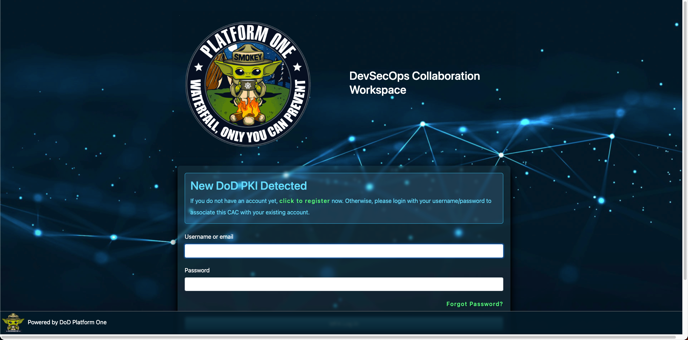
- Go to the P1 login page. You will be prompted to authenticate with your government access card. The first time you authenticate, you will see a message acknowledging detection of a new access card.
-
Enter your P1 username and password.
-
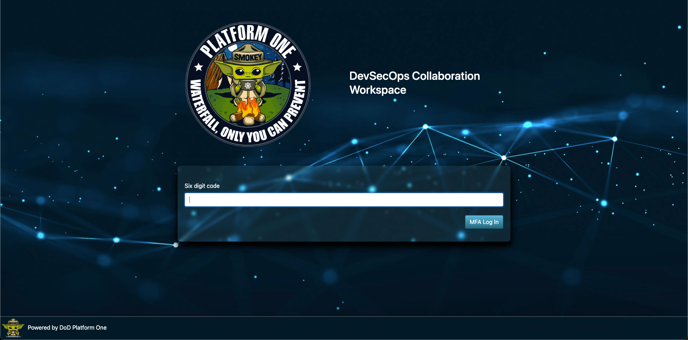
Enter your Multi-Factor Authentication (MFA) code.
-
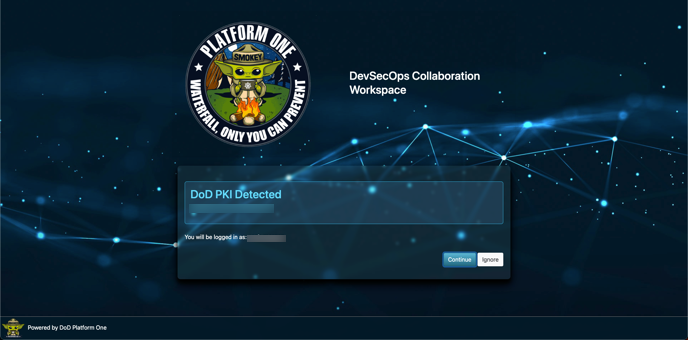
Confirm the association request when prompted. This confirmation links your access card to your P1 SSO account. Future logins will automatically authenticate with your government access card.
What to expect after linking your card
Once your government access card is successfully linked:
- You can authenticate into IL4+ environments via P1.
- The system will automatically attempt to use your access card when logging in.
- If the card is not detected, you may still enter your P1 SSO username, password, and MFA code — but a government access card is always required for IL4+ access.
Access requirements for users outside the NIPRNet
The Non-classified Internet Protocol Router Network (NIPRNet) is the DOW's private network for transmitting unclassified but sensitive information.
If you are accessing IL4+ environments outside of the NIPRNet or its VPN (e.g., Air Force Desktop Anywhere), you must use Appgate SDP - a DOW-approved authentication solution - for secure access. Appgate must remain open and active for the duration of your session.
To set up Appgate, see Install Appgate SDP.
FAQs
Why don’t I have access after setting up my P1 account?
This is often because you haven’t yet attempted to log in to Game Warden app.
After creating your P1 SSO account and being added to Game Warden, you must log in at least once. This initial login triggers the import of your user data from P1 into Game Warden’s Keycloak (our identity management system).
Once your account is imported, a Game Warden Keycloak administrator can assign the appropriate group memberships associated with your company.
Where can I find more information or get support for P1?
Refer to the Platform One FAQ for common questions and login troubleshooting. For additional support, contact aflcmc.hncx.helpdesk@us.af.mil.