Static Application Security Testing
Static Application Security Testing (SAST) analyzes application source code, bytecode, or binaries without executing the application to detect security vulnerabilities. This white-box testing approach allows early detection and remediation of issues before deployment.
SAST helps identify:
- Code-level vulnerabilities (SQL Injection, XSS, insecure cryptography)
- Sensitive data exposure (hardcoded passwords, API keys, secrets)
- Issues aligned with Common Weakness Enumeration (CWE) or Open Worldwide Application Security Project (OWASP) Top 10 and other mappings such as CWE Top 25
Regular SAST scanning improves security posture, reduces compliance risk, and ensures production-ready code.
What is an Artifact?
An artifact is the output of your SAST scan and should include:
- Severity of each finding (Critical/High/Medium/Low)
- Justification and mitigation for Medium/Low findings
- CWE or OWASP Top 10 references for security findings
- Scanned commit hash or release version
- Scan tool name and version
- Scan date
The artifact is the official deliverable submitted to Game Warden for review and audit purposes.
SAST artifacts requirement
As part of our security screening of your application, Second Front Systems requires artifacts stemming from SAST. Artifacts from these testing regimes are crucial components of the Authorization Package, the body of evidence provided to government accrediting officials that facilitates a rapid risk determination for your application.
Customers must:
-
Perform SAST scans on all codebases included in the containers/images deployed onto Game Warden.
- Attest in the Body of Evidence (BoE) that the scanned code matches the deployed code.
-
Generate SAST artifacts no older than 30 days at the time of Authorization Package submission.
-
Remediate all Critical and High findings before submission.
- Reports may only include Critical/High findings if documented as confirmed false positives with supporting evidence.
-
Provide justifications, mitigations, and remediation timelines for Medium and Low findings.
- Upload artifacts in an accepted format (PDF, XML, HTML, JSON).
In the Game Warden application, you can upload these artifacts and check the Attestation checkbox in the BoE/BoE. Accepted artifact formats are PDF, XML, HTML/HTM, or JSON.
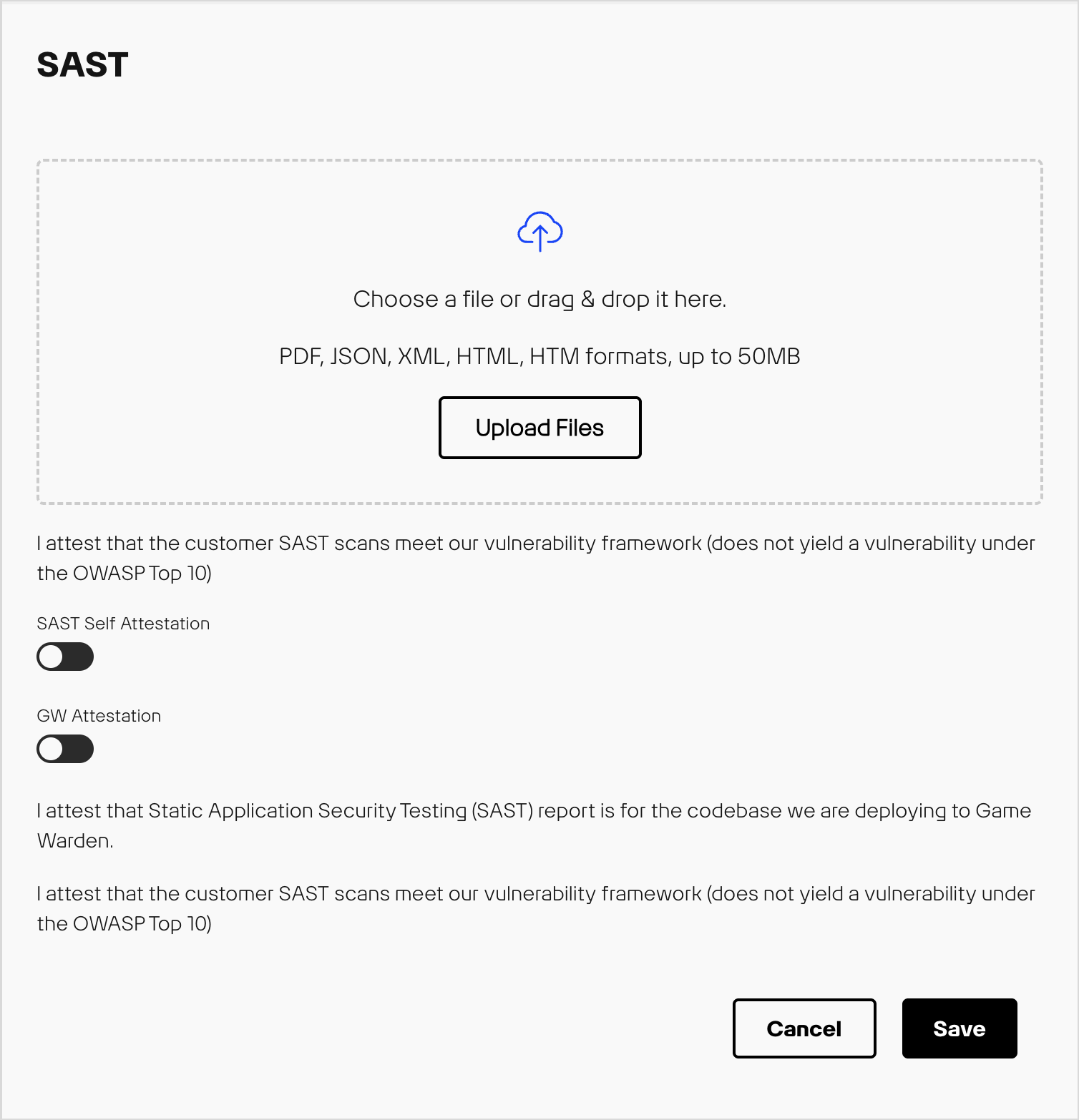
SAST artifacts requirements
SAST artifacts are required for any of the following:
- Initial Authorization: Application has not received an authorization from a government accrediting official.
- Renewal Authorization: Application currently undergoing authorization renewal with government accrediting official.
- Significant Change Authorization: The application requires a new authorization approved by government accrediting official due to a major version release or significant change from the previous authorization.
- Ad hoc requests to support government accrediting official continuous monitoring requirements.
Clarifying SAST Scan scope
To ensure complete coverage, customers should include:
- Application source code (all languages and modules used in deployment)
- Dependencies or libraries if scanned by SAST
Warning
Scanning only a development branch not intended for production or partial code may result in incomplete findings and non-compliant artifact submissions.
CWE guidance for SAST
The CWE is a standardized list of software and hardware weaknesses maintained by MITRE. Each CWE has a unique identifier (CWE-ID) describing the underlying code or design weakness.
CWE is widely referenced by SAST tooling to classify detected issues. CWE is not a scanner itself and is only utilized as a classification system. SAST tools map findings to CWEs, helping developers and security teams to understand the type and severity of the risk.
How CWE relates to SAST and Game Warden
- SAST tools map detected weaknesses to CWE-IDs.
- Each CWE indicates the type of weakness and potential security impact.
- Game Warden uses CWEs to define which issues are critical to remediate for production deployments.
Example
A SAST tool flags a SQL query constructed from user input. It maps to CWE-89 (SQL Injection), which falls under the broader Injection category within the OWASP Top 10 web application security risks. The SAST tool has flagged this as a critical finding and would need to be remediated prior to artifact submission.
SAST Acceptable Baseline Criteria
Second Front Systems employs a “Meets/Does Not Meet” framework to determine SAST artifact acceptance.
| Outcome | Requirements |
|---|---|
| Meets |
|
| Does Not Meet |
|
Important
Only security-related findings mapped to CWE and OWASP are enforced under Game Warden SAST policy. Categories such as maintainability, code reliability, or other non-security findings do not require remediation unless they introduce a security risk.
SAST Severity and Remediation table
| Severity | Requirement | Remediation Timeline |
|---|---|---|
| Critical & High |
|
|
| Medium |
|
|
| Low |
|
|
Important
The final SAST artifact must not contain any unresolved Critical/High security-related findings.
- Remediate, rerun SAST scans and generate a clean SAST artifact
- Document false positives with supporting evidence
- Reports with open Critical and High findings will be rejected and delay authorization
Customer example SAST checklist and best practices
Before the SAST Scan:
SAST Scanning process:
After the SAST Scan:
Note: For Medium and Low security-related findings, provide justification, mitigations and remediation timelines per severity table.
Final submission check:
Submit only when your SAST artifact contains no unresolved Critical/High security-related findings and all medium and low findings have justifications, mitigations and remediation timelines documented.
Ongoing best practices:
- Run SAST scans at least every 30 days or before major releases
- Integrate scans into CI/CD pipelines to catch issues early
- Track and trend security-related findings over time to monitor posture
- Update SAST rulesets and tooling regularly for new vulnerabilities
Common pitfalls
Do I need to fix duplicated strings, maintainability, code smells or other non-security related warnings reported by my SAST tool?
No. These issues are not required for Game Warden SAST submission unless they introduce a security risk. Focus primarily on security-related findings mapped to CWE and OWASP Top 10.
How should I handle false positives?
All false positives must be documented with supporting evidence in the SAST artifact. This ensures auditors and reviewers understand why a reported issue is not a real vulnerability.
Can I only scan a development branch or part of my code base not being deployed onto Game Warden?
No. Only scanning a subset of code or development branch not intended for production may result in incomplete findings and non-compliant artifacts. Always scan the full codebase that will be deployed onto Game Warden.
What if the artifact does not match the deployed code?
Ensure the SAST artifact corresponds to the exact commit or release version being deployed. Mismatched artifacts can lead to audit issues and rejected submissions.
How do I interpret tool categories such as maintainability or reliability?
For Game Warden, focus on security-related findings mapped to CWE and OWASP Top 10. Other categories (maintainability, reliability, code style) are optional unless they introduce a security risk and can be addressed according to your internal priorities.
SAST scanning tools
When selecting SAST tools suitable for government use, popular options include:
- Checkmarx
- Veracode
- SonarQube
- Fortify on Demand
- Coverity
- Aikido
These tools provide robust security features, strong compliance capabilities, and support for government-mandated standards, making them well-suited for sensitive applications.
Additional resources
- CWE Top 25: https://cwe.mitre.org/top25/
- MITRE CWE List: https://cwe.mitre.org/data/index.html
- OWASP Top 10: https://owasp.org/www-project-top-ten/